
Windows 11 Pro + Office 2024 Standard Bundle
The Windows 11 Pro + Office 2024 Standard Bundle is a practical package for home users, businesses, and freelancers who want to update their operating system and office environment at the same time. The bundle price is 462,60 zł, and the most important principle of this product is very simple: you receive two separate products and two separate activation keys.
This means that the licenses are not technically "linked" together. The Windows 11 Pro key applies to the system, and the Office 2024 Standard key applies to the office package. This gives you greater flexibility when deploying, reinstalling, or replacing hardware.
What the bundle includes
When purchasing this package, the customer receives:
- 1 license for Windows 11 Pro
- 1 license for Office 2024 Standard
- 2 separate activation keys: one for Windows and one for Office
- installation and activation instructions
- the possibility of online activation, and also by phone if needed
The most important benefits:
- separate keys for each product
- possibility of installation on different computers, if it complies with the conditions of the license and your deployment scenario
- convenient purchase of two necessary products in one transaction
- savings compared to purchasing products separately, both in terms of total cost and time required for purchase and deployment
Requirements and compatibility
Windows 11 Pro
Windows 11 Pro requires a computer that meets Microsoft's requirements, in particular:
- a 64-bit processor compatible with Windows 11
- at least 4 GB of RAM
- at least 64 GB of disk space
- TPM 2.0 module
- UEFI / Secure Boot enabled
- internet connection for some configuration and activation operations
The system works best on newer business and home computers. If the device does not meet the Windows 11 requirements, it's worth verifying the hardware compatibility beforehand.
Office 2024 Standard
Office 2024 Standard is designed for Windows systems and requires:
- a supported Windows system installed
- sufficient free disk space
- an internet connection for download, updates, and activation
The package is suitable for users who need classic office applications without the need to use the Microsoft 365 subscription model.
Installation and activation
Installation via graphical interface
Windows 11 Pro
- Download the ISO image or run the Windows 11 installer.
- Perform the system installation or update from a previous version.
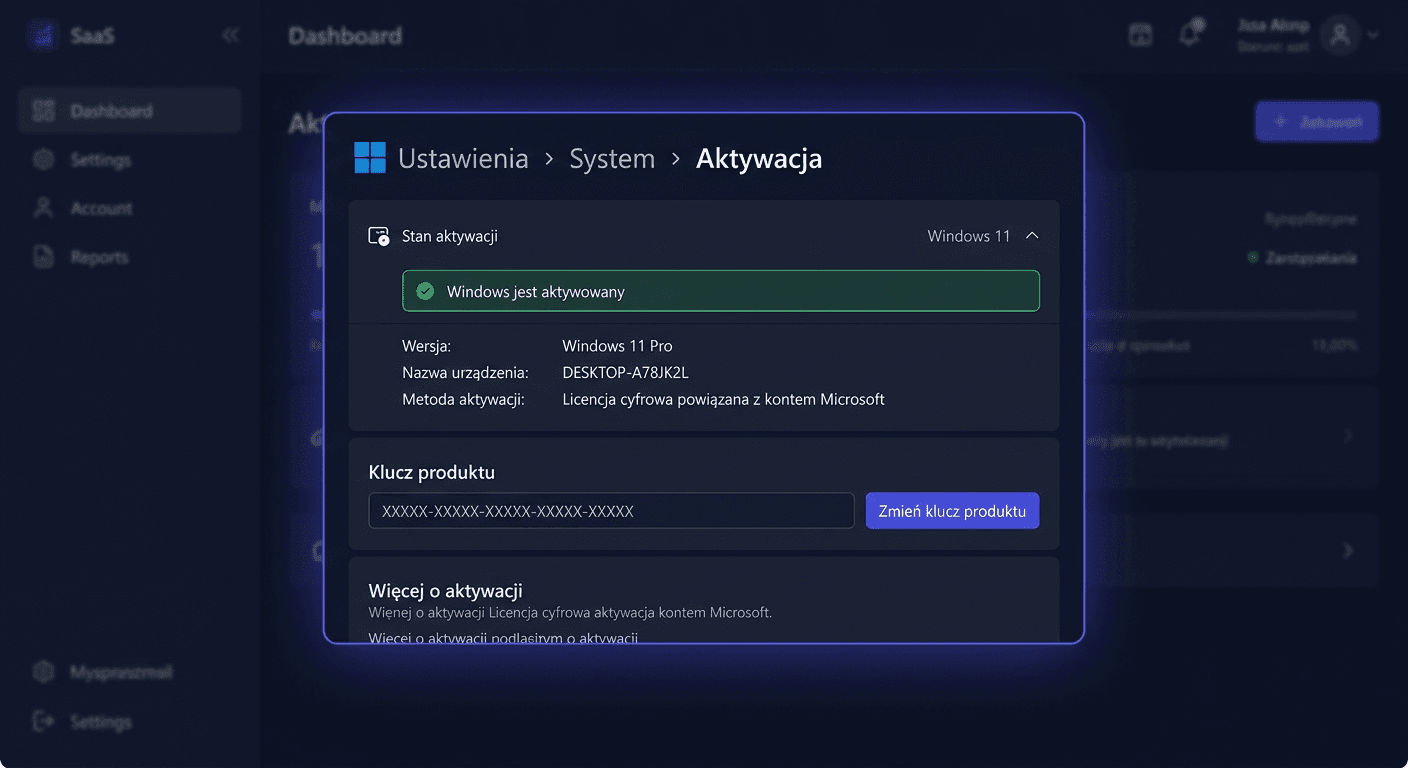
- After installation, go to: Settings > System > Activation > Change product key
- Enter the key assigned to Windows 11 Pro.
- Confirm and wait for activation.
Office 2024 Standard
- Download and install the Office 2024 Standard package.
- Launch any application, e.g., Word or Excel.
- When the activation window appears, enter the key assigned to Office 2024 Standard.
- Complete the activation according to the on-screen prompts.
If you have any questions or need assistance, please contact us at [email protected] or call us at 00 800 121 1654.
Activation via CMD
If activation via GUI fails or you want to perform it manually, you can use the command line launched as an administrator.
Windows 11 Pro
slmgr.vbs /ipk XXXXX-XXXXX-XXXXX-XXXXX-XXXXX
slmgr.vbs /ato
The first command installs the product key, and the second sends an activation request to the Microsoft server.
Office 2024 Standard
Depending on the architecture and installation location, go to the Office directory and use:
ospp.vbs /inpkey:XXXXX-XXXXX-XXXXX-XXXXX-XXXXX
ospp.vbs /act
For example, the directory may look like this:
cd "C:\Program Files\Microsoft Office\Office16"
or in the 32-bit version on a 64-bit system:
cd "C:\Program Files (x86)\Microsoft Office\Office16"
Telephone Activation
If internet activation fails, you can use Microsoft's telephone activation at:
00 800 121 1654
Before contacting, prepare:
- information about which product the activation concerns
- the installation ID displayed by the system or Office
- the product key for the relevant component
Remember that there are two different keys, so Windows and Office activation can be performed separately.
Activation Verification
After completing the installation, it's worth checking the status of both products.
Windows 11 Pro
- go to Settings > System > Activation
- the status should indicate that the system is activated
You can also use:
slmgr.vbs /dli
or:
slmgr.vbs /xpr
Office 2024 Standard
The status can be verified with the command:
ospp.vbs /dstatus
The result should confirm product activation and license status.
Troubleshooting
The most common problems with activation:
1. Error: key does not match this product version
Cause:
- a different edition is installed than the one for which the key is intended
Solution:
- make sure you are installing Windows 11 Pro, not Home
- make sure you are installing Office 2024 Standard, not another edition
2. Error: no connection to the activation server
Cause:
- internet problem, firewall, VPN, or temporary unavailability of services
Solution:
- check your internet connection
- disable VPN or proxy
- try again after a few minutes
- if necessary, use telephone activation: 00 800 121 1654
3. Error: key has already been used or activation is not possible online
Cause:
- additional activation verification is required
Solution:
- initiate telephone activation
- make sure you enter the correct key for the given product
- do not use the Windows key for Office or vice versa
4. Error: ospp.vbs or slmgr.vbs does not work
Cause:
- CMD was launched without administrator privileges or from an incorrect location
Solution:
- launch Command Prompt as Administrator
- for Office, go to the correct installation directory before using
ospp.vbs
If you need help or have questions, please contact us at [email protected] or visit our website for more information.
Comparison with alternatives
Separate purchase
Buying Windows and Office separately only makes sense when you need one product immediately and the other later. In most typical scenarios, a bundle is more convenient and organisationally more cost-effective. You get everything for a single price of 462,60 zł, with a clear division into two separate keys.
Microsoft 365
Microsoft 365 is a subscription-based model. It works well where cloud services, sharing, and fixed monthly or annual fees are needed. Office 2024 Standard will be a better choice for those who prefer a classic licence without a subscription.
Older systems and older Office
If you are still using older versions of Windows or Office, it's worth considering migration. In the case of older products or those with expiring security support, you should not delay updates. When it comes to legacy or ESU solutions, you need to consider migration risk and a transition plan to a newer platform, rather than treating such a purchase as a long-term solution.
Summary
Windows 11 Pro + Office 2024 Standard is a bundle for those who want to quickly set up a complete work environment and avoid subscriptions where they are not needed. The most important advantages of this package are two separate keys, the possibility of flexible deployment, as well as time and cost savings compared to searching for products separately.
If online activation is problematic, you can use Microsoft's telephone activation at 00 800 121 1654. When deploying, remember: Windows and Office are activated separately, each with its own key.