
Windows 11 Home + Office 2024 Home and Student Bundle, 2 separate keys, 470.73 zł
The Windows 11 Home + Office 2024 Home and Student bundle is a practical package for home users, students, and small businesses, allowing you to prepare your computer for daily work right away. For 470.73 zł, you receive two separate products and two separate license keys: one for the operating system and the other for the office suite. This is important because both products can be activated independently of each other, and in certain applications, you can even install them on different computers, provided this complies with the license assignment conditions for devices.
What the bundle includes
Buyers receive:
- a license and activation key for Windows 11 Home
- a license and activation key for Office 2024 Home and Student
- installation and activation instructions
- the possibility of self-verification of activation after installation is complete
The most important feature of the bundle is separate keys for each product. This is not a single shared code. Thanks to this:
- you can activate Windows and Office independently
- you can perform the installation at different times
- it's easier to diagnose any activation issues
- you gain more flexibility than with "all-in-one" solutions
Purchasing the bundle also means savings compared to buying both products separately. This is a more convenient solution for individuals who need both the system and a legal office suite anyway.
Requirements and compatibility
Windows 11 Home
To install Windows 11 Home, your computer should meet Microsoft's requirements, including:
- a 64-bit processor compatible with Windows 11
- at least 4 GB of RAM
- at least 64 GB of disk space
- UEFI, Secure Boot
- TPM 2.0 module
- internet connection during some configuration stages
Office 2024 Home and Student
The Office 2024 Home and Student suite is designed for home and educational use. It includes classic applications, usually:
- Word
- Excel
- PowerPoint
- OneNote
Office requires a compatible Windows system and an up-to-date system environment. The most convenient and natural choice for this bundle is Windows 11 Home.
If you are currently using older systems, such as Windows 7, 8, or configurations based on legacy or ESU solutions, it's worth planning a migration. Older platforms can cause compatibility, update, and security issues.
Installation and activation
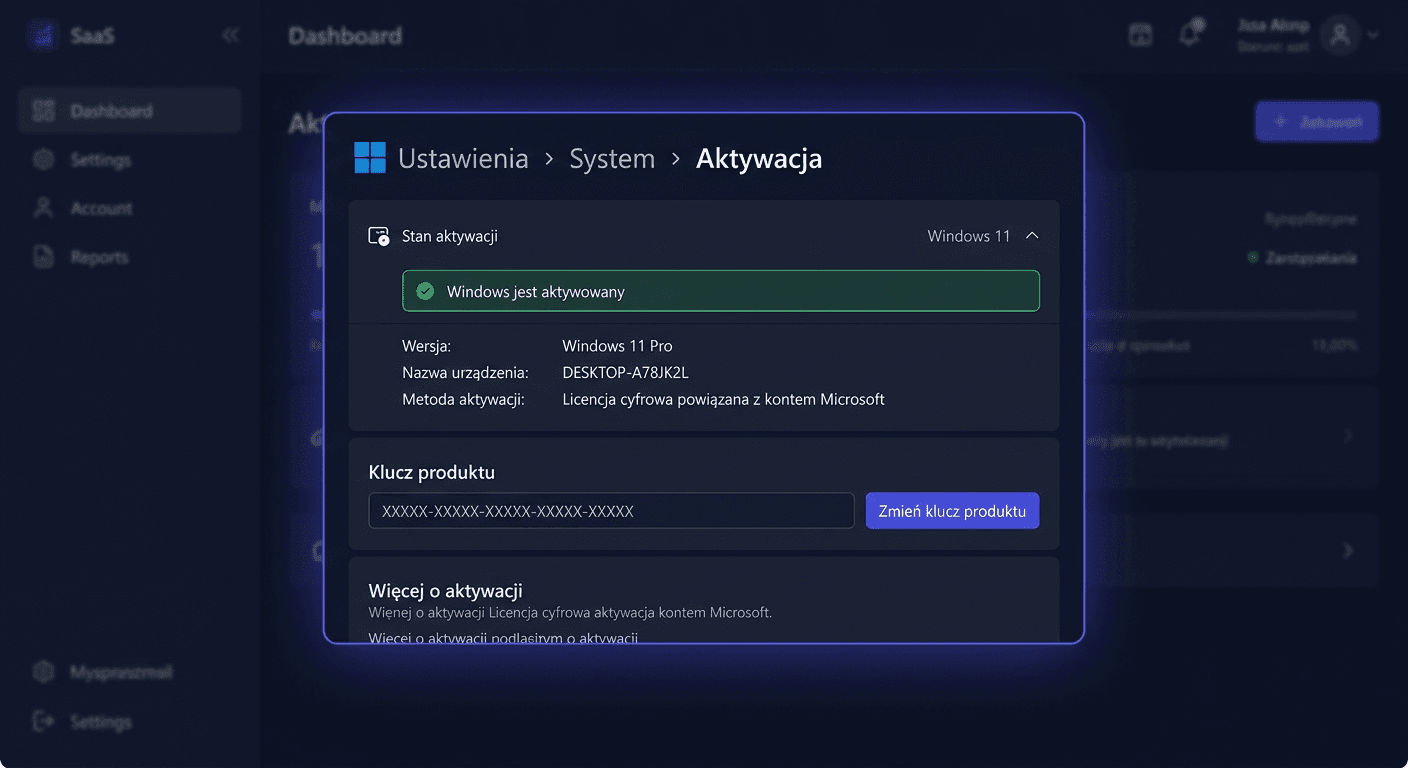
Activating Windows 11 Home through the graphical interface
- Open Settings.
- Go to System > Activation.
- Choose the option to change the product key.
- Enter the Windows 11 Home key.
- Confirm and wait for the activation message.
Activating Windows 11 Home through CMD
Run Command Prompt as administrator and type:
slmgr.vbs /ipk YOUR-WINDOWS-KEY
slmgr.vbs /ato
The first command installs the key, and the second initiates online activation.
Installing and activating Office 2024 through the graphical interface
- Install the Office 2024 Home and Student suite.
- Run any application, for example, Word.
- Log in if the installer requires it.
- Enter the separate Office product key.
- Complete the activation according to the on-screen prompts.
For any questions or concerns, please contact us at [email protected] or call 00 800 121 1654.
Activating Office 2024 via CMD
Run the Command Prompt as administrator, go to the Office directory and execute:
ospp.vbs /inpkey:TWÓJ-KLUCZ-OFFICE
ospp.vbs /act
In practice, the ospp.vbs file is usually located in the Office installation folder, for example:
cd "C:\Program Files\Microsoft Office\Office16"
ospp.vbs /inpkey:TWÓJ-KLUCZ-OFFICE
ospp.vbs /act
Telephone Activation
If online activation fails, you can use telephone activation by calling:
00 800 121 1654
It's a good idea to have:
- the product key
- the installation ID, if the system or Office displays it
- information about which product the issue concerns: Windows or Office
Verifying Activation
After completing the process, it's worth checking the status of both products.
For Windows:
- Settings > System > Activation
- the message should indicate that the system is activated
For Office:
- open Word or Excel
- go to File > Account
- check the subscription or product activation status
Additionally, in CMD, you can confirm the correctness of the process after executing the commands slmgr.vbs /ato and ospp.vbs /act, observing the final messages.
Troubleshooting
Error 1: the key does not work or is rejected
The most common causes:
- typo when entering the key
- using a Windows key in Office or vice versa
- attempting to activate the wrong product edition
Solution: make sure to use the correct, separate key for the corresponding product.
Error 2: no connection to the activation server
Symptoms:
- activation stops
- a message about the unavailability of the service appears
Solution:
- check your internet connection
- temporarily disable the firewall or proxy if they block the connection
- try again after a few minutes
- if necessary, use the phone 00 800 121 1654
Error 3: Office cannot find ospp.vbs
This usually means that the command was run in the wrong directory.
Solution: go to the Office installation folder and then use:
ospp.vbs /inpkey:TWÓJ-KLUCZ-OFFICE
ospp.vbs /act
Error 4: the system reports that the license is already in use
This can happen after changing hardware or with previous incomplete activation.
Solution:
- check the installation history
- make sure on which device the license was used
- if the situation requires confirmation, use telephone activation
Comparison with Alternatives
Buying Separately
Buying Windows 11 Home and Office 2024 separately only makes sense if you only need one of these products. If you plan to use both, a bundle usually means better final cost and less formalities.
Microsoft 365 instead of Office 2024
Microsoft 365 is a subscription-based model. Office 2024 Home and Student is a one-time solution, without recurring fees. For many home users, this is a more beneficial and predictable option.
Free Office Suites
Free alternatives may be sufficient for simple tasks, but they may struggle with document formatting, spreadsheets, or full compatibility with Word and Excel files. If you care about compatibility and stability, Office 2024 remains a safer choice.
For any questions or concerns, please contact us at [email protected] or call 00 800 121 1654.
Summary
Windows 11 Home + Office 2024 Home and Student for 470.73 zł is a reasonable package for those who want to legally and conveniently prepare their computer for learning, work, and everyday tasks. You receive two separate products, two separate keys, the possibility of independent activation, and real savings compared to a separate purchase. In case of activation problems, it's worth using the telephone procedure by calling 00 800 121 1654.